RPI5 as a HES running postmarketOS & Plasma Bigscreen
This article is part of the Pool’s Tech Adventure and Tutorials series.
I recently decided to stop connecting my Samsung TV to the internet. I really disliked doing it, but the convenience of accessing Plex (I have a friend who shares access to his media server) via the TV was too tempting. Not anymore, I said.
I am also a follower of the Plasma Bigscreen project ever since their relaunch. So I decided to give it a try, following the advice of the project I used postmarketOS. I had a Raspberry Pi 5 with 8 GB of RAM laying around, and a free afternoon.
Review
It works \o/. Considering this rather unique setup, this was all I hoped to achieve. It boots perfectly fine into Bigscreen, the HDMI CEC worked out of the box so I can control the nice interface with the TV remote. I can run VacuumTube. Aaaand thats about it. I thought a demo is nice for that, so here you go:
As mentioned before, I wanted to run Plex on it. That just won’t happen. The Plex app is not available for the Raspberry Pi’s aarch64 architecure and it won’t be anytime soon. An alternative app, Girens isn’t supporting Wayland and Bigscreen only supports that ofc. Since that was my main use case, I can already not really implement it. It does get worse though.
I tried to use Jellyfin since I know a lot of people use that instead of Plex. While the app was available, it did not open, complaining about missing hardware decoder. I do not care to further get into this issue, if someone does here is the log and you can contact me I can run test.
While I said I can use VacuumTube, this does not really apply to playing videos. The navigation works great, but with 1080p the sound starts lagging behind the video, and a higher quality just buffered after a couple seconds. My guess would be that the app does not use Hardware encoding. I am able to use KODI/LibreELEC to play Plex 4k video streams totally fine, and Jeff Geerling also, according to his blog post.
I have to agree with nick from the very nice Bigscreen matrix chat: Unless you already have a Pi, and you can’t afford to spend money on a second dedicated device (which makes me wonder how you ended up with a Pi in the first place since they are so expensive nowadays), you should really rather buy an used old computer with a dedicated graphics chip and you will have a much better experience. They suggested a N100 motherboard. I personally have my computer sitting right next to it, and I just like to have dedicated hardware. But I don’t think I can keep this setup, it’s rather inconvenient for my flatmate.
Tutorial
I promised some people to write up how I installed and setup postmarketOS and Plasma Bigscreen on my Pi, so here I go.
You need to install pmbootstrap somehow, which is the postmarketOS build tool. After that you need to run
$ pmbootstrap initwhich will guide you through the setup process. I was fine just picking defaults, only notable that I selected edge and the Plasma Desktop interface ofc. I just would like to point out that the installer will tell you that the kernel is not mainline, unlike the wiki page. This changed in !7319, but apparently is not reflected in the wiki page, and the warning of the installer that the downstream kernel is really broken also doesn’t apply to linux-rpi kernel.
Anyway, after init is done, following the wiki page you can now flash it to the SD card with
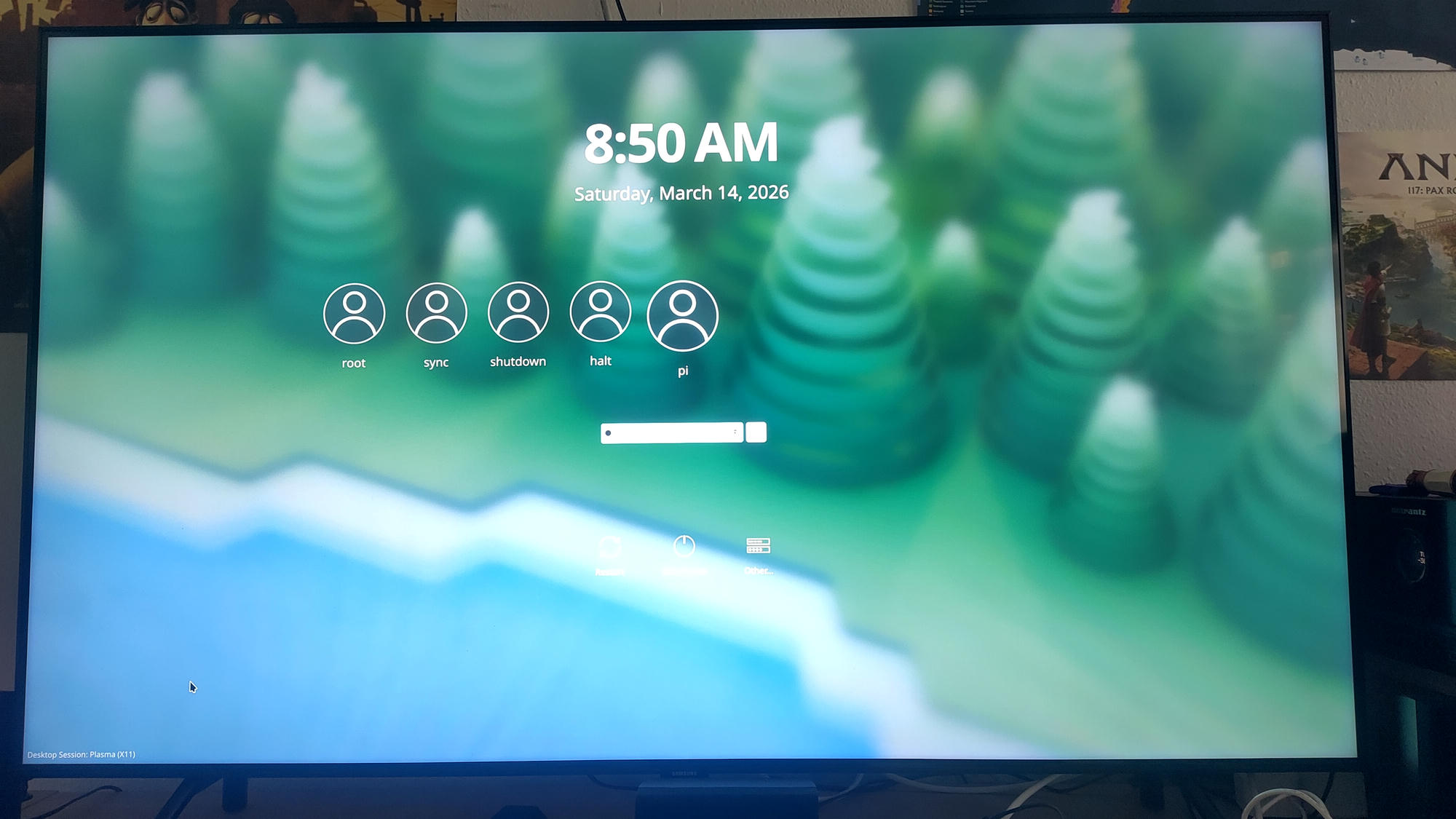
$ pmbootstrap install --sdcard=/dev/sdX # (Replace /dev/sdX with your SD card's device path)Now postmarketOS boots. I selected the user (I named it pi ofc), and you have to switch in the bottom left to Wayland, it selected X11 by default for me. I will now show you how this screen looked on my end and how easy it was to miss that, because this little switch was really an annoying roadblock.
Now you are in and want to install Bigscreen. That currently only lives in Nightly. The setup instructions from the wiki page have changed since I did this. I will paste my old ones for reference, but you should probably follow the new ones:
New:
$ doas apk upgrade -Ua
$ doas apk add postmarketos-repo-nightly-kde
Old:
$ doas apk upgrade -Ua
$ doas wget https://nightly.postmarketos.org/kde-nightly/$(cat /etc/apk/arch)-ci@nightly.postmarketos.org.rsa.pub -P /etc/apk/keys/
$ echo "https://nightly.postmarketos.org/kde-nightly/" | doas tee -a /etc/apk/repositories
After that, you should upgrade, reboot and you can add Bigscreen \o/
$ doas apk upgrade -Ua
$ doas reboot
$ # After you logged in
$ doas apk add plasma-bigscreen
$ doas reboot
Now it appears in the bottom left, where you had to select Wayland before. Always having to login is a bit annoying though, so I consulted the always excellent Arch Wiki and following that added an autologin conf to plasmalogin:
$ doas mkdir /etc/plasmalogin.conf.d/
$ doas vi /etc/plasmalogin.conf.d/autologin.conf
with the content
[Autologin]
User=pi
Session=plasma-bigscreen-wayland.desktop
Hope this is helpful to someone :)